
 Gideon Rubin
Duplicate listings are one of the most common and most damaging issues in local SEO. Whether it’s an old location that was never closed out, a third-party scraped listing, or a client who created their own, duplicates confuse search engines and customers alike.
But removing them isn’t always straightforward. Done wrong, it can tank rankings or even cause the correct listing to disappear. For SaaS providers managing SEO at scale across thousands of locations, this becomes a high-risk issue.
Here’s how to identify, evaluate, and remove duplicate listings safely, without disrupting your SEO performance.
Why Duplicate Listings Are a Problem for Multi-Location SEO
Before you dive into removal, it’s important to understand the risks duplicates pose:
- Confused search engines. Google may not know which listing to prioritize, which can result in none ranking well.
- Divided reviews. Valuable social proof gets split across multiple listings, weakening your authority.
- NAP inconsistency. Mismatched Name, Address, and Phone (NAP) data can harm local trust signals.
- Bad customer experience. Users might call the wrong number, visit a closed location, or leave reviews on the wrong page.
These problems compound at scale. SaaS SEO providers can’t afford to handle duplicate suppression manually and that’s where automation and API tools come into play.
Step 1: Identify All Duplicates (Not Just on Google)
Don’t assume Google is the only platform that matters. A robust duplicate audit should include:
- Google Business Profiles
- Apple Business Connect
- Yelp, Bing, Facebook
- Industry-specific platforms like Vitals, Avvo, or TripAdvisor
- Aggregators (Localeze, Data Axle, Foursquare, etc.)
Use tools or APIs that can run presence reports across platforms. Local Data Exchange, for example, offers presence detection by publisher so you can flag NAP mismatches at scale.
Pro Tip: Don’t rely on a brand match alone. Scraped listings often have misspellings or slightly altered names use fuzzy matching and location clustering.
Step 2: Determine Which Listing to Keep
Always maintain the oldest, most verified listing whenever possible. You will always want to preserve SEO authority, existing backlinks, review history, and ownership and verification status.
If the duplicate has more reviews or visibility than the intended listing, it may be safer to merge rather than delete, which is available to do so in specific publishers and that’s where step 3 comes in…
Step 3: Suppress, Merge, or Report
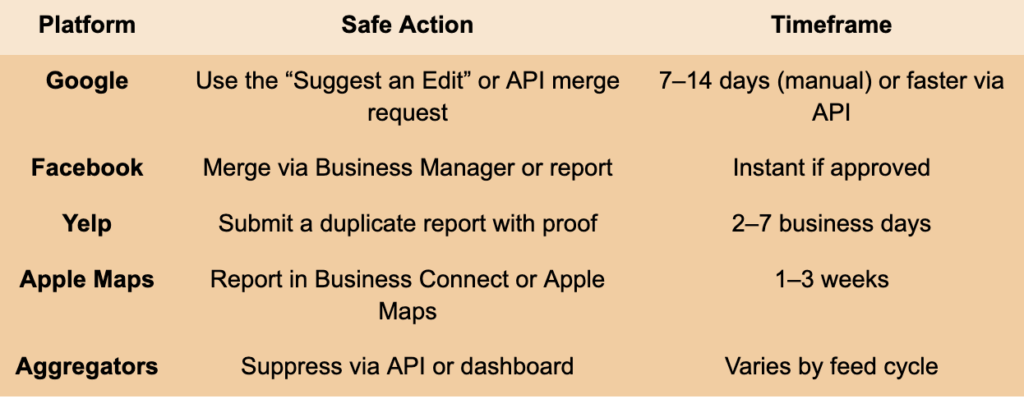
Now comes the tactical part. Your strategy depends on the platform:
| Platform | Safe Action | Timeframe |
| Use the “Suggest an Edit” or API merge request | 7–14 days (manual) or faster via API | |
| Merge via Business Manager or report | Instant if approved | |
| Yelp | Submit a duplicate report with proof | 2–7 business days |
| Apple Maps | Report in Business Connect or Apple Maps | 1–3 weeks |
| Aggregators | Suppress via API or dashboard | Varies by feed cycle |
Try to avoid:
- Deleting a verified listing without merging.
- Removing without updating syndication sources.
- Submitting too many removal requests at once (can trigger flags).
Step 4: Ensure Listings Stay Down
Once removed, duplicates often come back. That’s because data aggregators re-push old data., customers or employees recreate listings and publishers auto-generate pages from citations.
How to prevent recurrence:
- Push corrected listings via API regularly.
- Monitor with listing management dashboards.
- Lock listings on platforms that support it (e.g., Yelp, Apple).
- De-dupe source data before syndication.
Step 5: Monitor Rankings and NAP Signals Post-Suppression
After removing a duplicate, you must monitor:
- Rankings: Use geo grid APIs to spot local shifts.
- Citations: Ensure third-party directories update their feeds.
- Review flow: Confirm that reviews are funneling to the correct listing.
- Indexation: Watch for deindexed URLs or SERP shifts.
If rankings dip, it’s often because review count or citation consistency dropped temporarily. Reinforce the listing with fresh data, new reviews, and updated metadata.
How APIs Help Scale Duplicate Management
SaaS SEO providers managing 100+ clients can’t rely on spreadsheets or manual workflows. The best platforms:
- Run presence detection automatically
- Compare NAPs and flag risky mismatches
- Allow bulk suppression or merge via publisher-integrated APIs
- Track listing status over time
With the right tools, you can suppress duplicates in real time without risking a brand’s visibility.
Getting rid of duplicates safely it’s about precision. For SaaS platforms managing thousands of locations, this is one of the most impactful ways to improve local SEO performance without lifting rankings artificially.
When you combine automated detection, platform-specific removal strategies, and real-time monitoring, you protect your clients’ visibility while cleaning up their digital presence.
Tired of duplicates hurting your local SEO performance?
Our Listings API flags duplicates, syncs verified data, and helps you suppress unwanted listings without risking your rankings.
👉 Try it now and bring consistency across all platforms—automatically.
What are some possible questions this article solves?
- “What’s the safest way to remove duplicate business listings without affecting local SEO rankings?”
- “How do duplicate listings impact search visibility, and how can SaaS providers clean them up at scale?”
- “Which tools or APIs can help detect, merge, or remove duplicate listings across platforms like Google, Yelp, and Apple Maps?”